There's such a difference between a working demo and a system you'd trust with real customers when it comes to voice. I learnt this the hard way when we first tried hacking together SAMMY 3 in a week-long sprint. A 400ms audio delay that's imperceptible in testing becomes unbearable in the field1. Imho voice punishes sloppiness more than any other modality.
We used to sell a screen-aware voice AI agent as an NPM package (@sammy-labs/sammy-three) that handled real-time conversations while understanding visual context from a screenshare. The goal: an agent that could watch what a user was doing and help them through it in real time, without the mechanical turn-taking of every other voice agent on the market. We shipped it to hundreds of end users and got absolutely obsessive about quality.
The first time we deployed to a real customer, the agent activated on background noise and started chatting to itself. By the end of that week, we'd catalogued fourteen ways our 'production-ready' voice agent failed in environments that weren't our quiet office.
After deploying to hundreds of end users, I've distilled our internal memos and codebase into this post. Every section exists because something broke in production.
The Same Playbook
My first surprise getting into voice AI wasn't the complexity - it was the conformity. From startups to Fortune 500s, nearly every production voice agent I encountered in early 2025 followed the same playbook:
- Capture audio from the client microphone and stream to cloud infrastructure
- Transcribe using streaming STT to generate text
- Process with an LLM, including function calls and context injection
- Synthesize responses using TTS
- Stream audio back to the user while handling interruptions
The ASR → LLM → TTS pipeline makes intuitive sense. Break the problem into specialised, optimisable components. Voice Activity Detection handles turn-taking, triggering AI responses when users pause. I tried this architecture with the confidence of someone following a well-written framework. For us, it fell apart fast.
Latency hit us first. Pipeline systems enforce sequential processing - speak, wait, process, respond. Even the best-in-class pipeline (at that time) achieved ~510ms voice-to-voice latency (Deepgram STT: 100ms, GPT-4: 320ms, Cartesia TTS: 90ms)2. Human conversational turn-taking happens at ~230ms3. You're 2x slower than a natural conversation before you've written a single line of code. Beyond 1 second, satisfaction plummets and abandonment rates spike 40%+1. Filler utterances ("um", "ah") can't mask the fundamental sequential constraint.
Then there's turn-taking. Voice Activity Detection sounds sophisticated but it's usually just a timer counting milliseconds of silence. A thoughtful mid-sentence pause triggers the AI to jump in. Fast talkers get cut off. If you've used ChatGPT's voice mode, you know this frustration.
Worse, the components are isolated. ASR, LLM, and TTS operate as separate systems chained together. When speech recognition mishears "cancel my order" as "cancel my daughter," the LLM responds about family relationships and the TTS delivers it cheerfully. Three systems playing chinese whispers with no shared context.
The voice AI community did what engineers do best - they built elaborate workarounds. Semantic endpointing on top of VAD (Smart-Turn, OpenAI's semantic VAD)45. Adaptive silence thresholds per speaker (pause norms vary across cultures and individuals)3. Proactive non-response where models can decide not to speak6. Fillers like "mm-hmm" and "one moment" to mask processing time.
Some of these showed real promise. LiveKit's semantic EOU demo showed a dramatic drop in interruptions versus naive VAD7. AssemblyAI's streaming end-of-utterance detection added acoustic and semantic cues to infer intent-aware endpoints8.
I implemented all of these. They helped - sometimes dramatically. But I arrived at an uncomfortable conclusion: we were building increasingly sophisticated band-aids and workarounds for a fundamentally flawed architecture. You can make pipeline systems better. You can't make them feel natural.
Going Duplex
I remember the exact moment I had the a-ha moment in voice. I was testing Gemini Live's native audio processing in the studio at the end of 2024 when it first came out. Getting onto Gemini Live Studio, I expected the familiar robotic turn-taking. Instead, the AI responded to my half-formed question before I'd finished asking it - not in the jarring way of a broken VAD system, but with the natural timing of a colleague following my train of thought.
For the first time, I forgot I was talking to a machine. No mechanical pauses at all, no awkward interruptions, just natural back-and-forth that made me lose track of time. I shared my screen and got real-time advice on what I was looking at.
I can't lie, that fifteen-minute conversation did leave a seed in my brain for the possibilites with this tech, even though we only started building the voice product mid 2025. When we came round to the product idea, I was convinced that full-duplex, speech-to-speech models were the way we had to go if we wanted customers to have the same moment I had with Gemini Live.
The architectural shift was this: instead of the sequential pipeline that forces artificial turn-taking, duplex systems treat conversation as a unified, continuous task. They process and generate audio simultaneously - mirroring how humans actually converse.
The breakthrough is discrete audio tokens. Instead of converting speech to text and back, duplex models treat audio as another token type, preserving acoustic richness - emotion, intent, conversational timing. Incoming audio becomes token streams that capture both semantic content ("I need help with my order") and acoustic nuances (frustration, hesitation, speaking pace), all flowing through the same model core alongside text tokens.
Human conversation is inherently full-duplex - we listen and plan speech in parallel, swap turns in ~200–300ms, and use backchannels ("uh-huh", "yeah") to maintain flow3. Cultures vary (Japanese turn gaps are shorter than Danish), but the pattern is fast and predictive. Duplex models match this rhythm because they can predict responses while you're still speaking, handle natural overlaps, and generate authentic backchannels without explicit programming. They also use full session context to correct mis-hears inline - something pipeline ASR can't do because it operates independently. Pipeline systems either pause too long or interrupt too often, which is a top reason users hang up in production settings7.
Duplex Trade-offs
As of mid 2025, duplex came with painful trade-offs.
Most full-duplex models sacrifice reasoning power for conversational fluidity - smaller cores (under 10B parameters) optimised for audio processing speed, not knowledge depth. The audio modality's bandwidth requirements "budget-lock" models, forcing them to be smaller or diverting compute away from reasoning. Conversations feel natural but lack the instruction-following and world knowledge of frontier text models. Like talking to someone who's great at conversation but terrible at actually helping you.
Function calling was worse. I spent weeks debugging tool calls that worked flawlessly in text but failed unpredictably in duplex. OpenAI's own gpt-realtime model achieves only 66.5% accuracy on function calling benchmarks - up from 49.7%, but still only two out of three tool calls correct9. Instruction following improved from 20.6% to 30.5% on the MultiChallenge audio benchmark. Still under a third. My favourite failure mode to deal with though was when the model started literally reading out JSON responses, including the syntax.
| Dimension | Pipeline (ASR→LLM→TTS) | Duplex (Speech-to-Speech) |
|---|---|---|
| Latency | ~0.8–1.0s; ~0.5s with tuning | ~120–300ms; regresses in tool-heavy sessions |
| Tool use | Mature, reliable, streaming | Less reliable; often paired with text LLM |
| Turn-taking | Half-duplex feel; manual fillers | Native backchannels, overlap, micro-pauses |
| Cost | LLM tokens + TTS minutes | Audio tokens inflate context; higher compute |
| Context | ASR largely independent | Full session context; corrects mis-hears inline |
| Interrupts | App must cancel ASR/TTS | Native interrupt-in-flight handling6 |
| Multilingual | Strong if ASR supports target languages | Often strong; very good code-switching |
Researchers are closing these gaps though. Baichuan-Audio builds on a pretrained LLM with a two-stage training strategy to maintain language understanding while adding audio modelling, using a multi-codebook audio tokeniser and an independent audio decoder head to preserve text modelling capacity10. Google's Gemini Live API supports affective dialogue - the AI's tone adapts to the user's emotion - plus proactive non-response6.
Sesame trained on approximately 1 million hours of English audio. Their CSM uses a Llama backbone with a two-stage process, and in subjective testing without context, listeners showed no preference between generated and human speech. But with 90 seconds of conversational context, evaluators consistently favoured human recordings - prosodic limitations remain11. Meta's SyncLLM generated 212k hours of synthetic conversational data to address the training data bottleneck12.
I made a strategic decision with SAMMY 3: bet on duplex despite the limitations, and build the in house expertise. The conversational quality improvement was worth the engineering complexity of working around current gaps. We opted for Gemini Live. I won't get into how gobshite the API docs and unprompted endpoint changes were - we weren't aware of any of that when we made the switch :).
Pipeline still wins if you need reliable function calling, complex multi-turn workflows, or the full reasoning capability of frontier text models. Enterprise systems where reliability trumps conversational feel should stay on pipeline. Duplex wins if conversational quality and natural timing are paramount - short, focused interactions where you're willing to bet on rapid improvement in speech-to-speech capabilities.
Most production teams end up hybrid anyway: a small duplex model for conversation flow and timing, a larger text LLM for reasoning and tool chains, with cached summaries between turns to keep hand-off cost low.
Choosing the model is the easy part. What follows is everything that broke after we chose ours - organised by the system layer where it hurt.
Voice Agent Lessons
Voice agents aren't chatbots with speech - they're real-time systems coordinating audio, visual context, memory, tools, WebSockets, and UI. We separated concerns with a layered architecture:
Each lesson below represents a specific moment when our system broke or a user got frustrated. If you're building voice agents, you'll probably hit most of these.
Audio System
400ms Budget
Audio stuttering kills the experience faster than anything else. Users tolerate visual glitches, but they won't tolerate audio gaps.
We discovered this constraint the hard way: if JavaScript blocks the main thread for more than 400ms, pre-scheduled audio buffers run out and we ended up with audible gaps. That 400ms limit isn't just a performance goal at that point, but it's a design constraint. Everything flows from it.
We used three buffer layers. A JavaScript audio queue (640ms to 1.6s) as the primary defence against network jitter. A Web Audio API schedule-ahead buffer - we scheduled audio 600ms into the future using AudioBufferSourceNode.start(scheduledTime), so the browser's higher-priority audio thread keeps playing even when the main thread is busy. And thirdly, we had a 300ms startup buffer because the first seconds of any stream are most vulnerable before the queue builds up.
function scheduleBuffers(audioContext: AudioContext) {
  const SCHEDULE_AHEAD = 0.6; // 600ms look-ahead
  const BUFFER_SIZE = 7680; // 160ms of audio at 48kHz

  while (scheduledTime < audioContext.currentTime + SCHEDULE_AHEAD) {
    const chunk = audioQueue.shift();
    if (!chunk) break;

    const buffer = audioContext.createBuffer(1, BUFFER_SIZE, 48000);
    buffer.getChannelData(0).set(chunk);

    const source = audioContext.createBufferSource();
    source.buffer = buffer;
    source.connect(audioContext.destination);

    const startTime = Math.max(scheduledTime, audioContext.currentTime);
    source.start(startTime);

    scheduledTime = startTime + buffer.duration;
  }
}
When scheduledTime falls behind audioContext.currentTime, the buffer emptied and there was an audible gap. We logged these underruns and correlated them with render operations. More often than not, the culprit was a screen capture happening during audio playback. Then we made the attempt to move anything that managed to block the main thread long enough to drain the buffer into a Web Worker.
On the send side, we always validate audio data before shipping it to the API. We added length checks on base64-encoded chunks - empty or malformed data causes silent server-side errors that manifest as mysterious audio gaps seconds later. The failure is never at the point of the bug. It's downstream, in a different subsystem, and you'll waste hours if you don't validate at the boundary.
Noise in Production
Offices are quiet, but production is not.
Our first customer deployment proved this immediately. The agent activated on background noise, keyboard clicks, fan hum, barking dogs, open office chatter, any echo from speakers. You get the gist. Krisp's research shows that placing AI noise cancellation before VAD reduces false-positive triggers by 3.5x13. The problem isn't "noise" - it's acoustic complexity in real environments. If you're building on React Native with raw WebSocket audio, you won't even get browser-level AEC and noise suppression by default - you'll need to add it explicitly.
We handled this in layers, each catching what the previous one missed.
Browser-level suppression comes first. You get this for free with the right getUserMedia constraints:
const stream = await navigator.mediaDevices.getUserMedia({
  audio: {
    echoCancellation: true,
    noiseSuppression: true,
    autoGainControl: true,
    sampleRate: 48000,
    channelCount: 1,
  },
});
AI-powered suppression handles what browsers can't. We integrated Picovoice Koala for aggressive filtering in hard environments, with a Web Audio API fallback using a filter chain (high-pass at 70-120Hz to remove rumble, low-pass at 7-11kHz to remove hiss, dynamics compressor to even out volume spikes):
| Level | High-pass | Low-pass | Compressor Ratio | Use Case |
|---|---|---|---|---|
| Light | 70Hz | 11kHz | 4:1 | Quiet rooms with occasional noise |
| Medium | 90Hz | 9kHz | 8:1 | Normal offices |
| Aggressive | 120Hz | 7kHz | 16:1 | Cafes, open offices, construction |
The noise gate is the final layer. It's a state machine with four states: closed → opening → open → closing. The key to avoiding robotic-sounding gate behaviour is using setTargetAtTime() for smooth gain transitions instead of hard cuts:
// Smooth gate opening - not a hard switch from 0 to 1
gainNode.gain.setTargetAtTime(
  1.0,
  audioContext.currentTime,
  attackTimeMs / 1000
);

// Smooth gate closing
gainNode.gain.setTargetAtTime(
  0.0,
  audioContext.currentTime,
  releaseTimeMs / 1000
);
We shipped environment presets because tuning these parameters individually is tedious:
| Preset | Threshold | Attack | Hold | Release | Best For |
|---|---|---|---|---|---|
| Studio | 1.5% | 15ms | - | 250ms | Professional recording environments |
| Office | 2.5% | 30ms | 350ms | 150ms | Quiet offices |
| Home | 5% | 25ms | 450ms | 150ms | Home environments (default) |
| Noisy | 8% | 20ms | 600ms | 100ms | Cafes, open offices |
We defaulted to conservative settings across the board. Users can learn to speak clearly, but they won't forgive a system that interrupts meetings or responds to door slams.
Worklet Design
We originally had one worklet doing everything. Volume metering callbacks starved the streaming path and audio dropped out during loud passages. We split worklets by job because throughput and responsiveness have fundamentally different scheduling needs.
One worklet handled PCM16 conversion and streaming - throughput-focused, processing chunks reliably without dropping samples:
// Float32 from Web Audio API → Int16 for network transmission
for (let i = 0; i < samples.length; i++) {
  outputBuffer[i] = samples[i] * 32768;
}
The other handled volume metering and noise gate logic - responsiveness-focused, updating at ~25ms intervals. The volume calculation is a single subtle line:
this.volume = Math.max(rms, this.volume * 0.7);Math.max means volume instantly jumps to any new peak with no lag on speech onset, while the * 0.7 gives it a smooth decay when the signal drops. At 0.7 with 25ms intervals, the meter decays by 50% roughly every 60ms - fast enough to feel responsive, slow enough to look smooth.
Buffer size is a latency-stability tradeoff. We settled on 2048 samples at 48kHz - about 43ms per chunk, which was fast enough for responsive capture without drowning in overhead. Halving to 1024 lowered latency but doubled the processing callback frequency and increased dropout risk, while doubling to 4096 reduced CPU load but added enough conversational lag to feel wrong. We also shipped partial buffers when they filled rather than waiting for exact alignment, since waiting adds unnecessary latency.
For VAD sensitivity, we shipped presets instead of exposing raw parameters:
| Preset | Prefix Padding | Silence Duration | Best For |
|---|---|---|---|
| Low | 75ms | 350ms | Noisy environments - requires longer sustained speech |
| Medium | 50ms | 330ms | Balanced default |
| High | 40ms | 300ms | Quiet rooms - most responsive |
We also shipped a stutter analyzer for production debugging. It tracked audio underruns, long DOM operations during playback, correlation between screen captures and stutters, and buffer health metrics. Audio problems are invisible to standard debugging tools. You need purpose-built instrumentation.
Audio was half the battle. The other half was giving the agent eyes.
Visual Capture
Conversation Windows
Screen-aware voice agents need to see what users see, but not all frames matter equally. Context peaks at conversation boundaries, so we treated certain moments as critical windows that always trigger immediate capture:
- User starts speaking
- User stops speaking
- Agent starts response
- Agent completes response
- User interrupts agent
- Page navigation occurs
The interruption moment is easy to overlook, but it reveals what caused the user to override the agent - often the most useful context.
During agent speech, captures throttle to protect audio. Normal rate: 1 capture per second. During playback: one every 3 seconds. Critical windows fire regardless. Like a courtroom sketch artist - they don't draw constantly. They draw when something important happens.
Capture Performance
Our capture path went from 200-500ms per capture to 2-50ms, with a fixed 28MB memory footprint instead of the unbounded growth we started with. Canvas pooling was the biggest win - creating canvases per frame caused GC pressure with 50–100ms stalls that stuttered audio, so we pre-allocated three canvases and reused them round-robin:
const canvasPool: HTMLCanvasElement[] = [];
let poolIndex = 0;

for (let i = 0; i < 3; i++) {
  const canvas = document.createElement('canvas');
  canvas.width = 1920;
  canvas.height = 1080;
  canvasPool.push(canvas);
}

function getCanvas(): HTMLCanvasElement {
  const canvas = canvasPool[poolIndex];
  poolIndex = (poolIndex + 1) % canvasPool.length;
  return canvas;
}
Change detection saved the most CPU because the fastest capture is the one you don't do. We used a MutationObserver with 100ms debounce, which in steady UI states skipped ~95% of captures.
Full string comparison for change detection was too expensive. We sampled ~1% of the string with a fast hash:
function fastHash(str: string): string {
  let hash = 0;
  const step = Math.max(1, Math.floor(str.length / 100));

  for (let i = 0; i < str.length; i += step) {
    hash = ((hash << 5) - hash + str.charCodeAt(i)) & 0xffffffff;
  }

  return hash.toString(36) + str.length.toString(36);
}
Unified DOM processing was a big win. We originally processed the DOM twice - once for rendering, once for detecting interactable elements that were on screen. A single-pass processor that extracts both reduced overhead by 40–50% and kept outputs synchronised.
JPEG at 0.5 quality was the sweet spot for model input we found. We skipped font embedding for speed, used a 1500ms timeout to prevent hangs, and a white background for consistency. WebP compressed better but caused connection issues with some AI services.
DOM-to-canvas pipelines also rebuild expensive render contexts repeatedly, so we cached them per element and reused across captures.
Capture Resilience
Screen capture has more edge cases than you'd expect - CORS failures for external resources, browser performance variance (Chrome and Safari generally perform better for voice AI), Shadow DOM and custom elements, and environment-specific rendering differences. We shipped three strategies with automatic fallback:
- DOM-to-canvas rendering via
domToPng- fastest and most common getDisplayMedia- best for full screen when render capture can't handle the page- Fallback canvas - an 800x600 placeholder with "Screen capture in progress" and metadata
A placeholder with error context is better than silence. The model can still converse - it just can't see the screen for a moment.
Context System
Push Over Pull
Context is the most important thing to make sure that the CS Voice agent can actually help users. Otherwise, you've just gone and shipped the least useful dictation service...
We started with a pull model - the agent called a tool to fetch context when it thought it needed it. We found this slower and less reliable. The model didn't always know when to ask, and each tool call added latency.
Push-based injection changed everything. Instead of the model requesting context, we pushed it directly into the conversation by monitoring the transcript:
// Old approach - model had to decide when to ask
const toolCall = { name: 'getContext', args: { query: 'user information' } };

// New approach - context pushed at the right moment
session.sendClientContent({
  turns: [{ role: 'user', parts: [{ text: contextString }] }],
  turnComplete: true,
});
The critical bit is the turnComplete flag. true means "this is a complete turn, please respond." false means "absorb this silently." The difference between someone asking you a question in a meeting versus someone sliding you a note.
Fair warning: Gemini's API interprets this flag backwards from what you'd expect. Our adapter literally negates it - send(parts, !turnComplete) - because the raw API treats true as "don't respond."
This distinction controls everything. Memory and user context use turnComplete: true - the model should incorporate this and respond. System context, navigation updates, and element discovery use turnComplete: false - the model should absorb silently. Page context injects immediately on navigation and click context buffers during agent speech, injects during pauses. Memory context is injected only after user turns complete.
Loop Prevention
We also encountered a loop: user speaks → agent responds → turn completes → memory injection fires with turnComplete: true → agent responds to the injected memory → turn completes → memory injection fires again. Infinite loop. The agent repeats itself with slight variations, or suddenly goes on tangents about information nobody asked about.
The fix is to only inject memory after user turns, never after agent turns.
function handleTurnComplete(userMessage: string, agentMessage: string) {
  const isUserTurn = userMessage.length > 0 && agentMessage.length === 0;

  if (isUserTurn) {
    injectMemoryContext(memories);
  } else {
    // Agent just spoke - injecting here triggers another response
    return;
  }
}
We also added navigation deduplication - a 1-second debounce window that normalises URLs (strips query params and hash) to prevent duplicate navigation events from SPAs that update the URL multiple times during a single route change.
Memory Quality
Naive memory injection creates more noise than signal - dumping "related stuff" into context actually makes the agent worse, not better.
We enforced quality gates at every step:
const memoryConfig = {
  minUserInputLength: 20, // Short queries return garbage matches
  minAgentOutputLength: 50,
  similarityThreshold: 0.6, // Started at 0.2, raised to reduce noise
  maxMemoriesPerInjection: 3, // More than 3 dilutes context
  searchDebounceMs: 2000, // Prevents API hammering during rapid speech
};
The similarity threshold is worth discussing. We started at 0.2 - basically "return anything vaguely related." The agent surfaced tangentially related memories that confused it more than they helped. Raising to 0.6 dramatically improved relevance. Three highly relevant memories beat fifteen loosely related ones.
We tracked injected memory IDs with a Set<string> to prevent duplicates - the same memory appearing twice wastes tokens and creates repetitive behaviour. Memory injection used a structured format with confidence scores:
[LIVE CONTEXT] Related knowledge:
1. User prefers TypeScript (0.95)
2. User works with React (0.87)
3. Last project was Next.js app (0.72)

Use this context for your response.
Agents without persistent memory repeat themselves and users hate it. Cross session persisitence allows the agents to learn from user preferences, past solutions, completed tasks, and session summaries across refreshes. Pre-call hydration loaded the user profile into the system prompt before the call started, so that context was always present and helped a tonne to make the agent personalised.
One debugging distinction that saved us when looking at logs: separate context.update (internal state changed) from context.inject (the LLM actually received it). Knowing whether the update happened but never reached the model - or the model got it and ignored it - cuts debug (and guessing) time.
Click Intelligence
Users click while the agent is talking. If you inject every click event immediately, you interrupt the agent's train of thought and flood context with noise.
Click context needs the same timing discipline as memory injection. Buffer clicks during agent speech and debounce rapid clicks (250ms minimum gap is the sweet spot we found). Only inject at natural conversational pauses with at least 1-second gaps between injections.
One non-obvious fix: only keep the latest click in the buffer, not all of them. We originally queued every click and injected them in order. Users would click three things while the agent was talking, and the agent would respond to click #1 - by which point the user had already moved past it. Keeping only the latest click means the agent responds to where the user is, not where they were.
We also filtered aggressively, only tracking clicks on elements that actually matter (buttons, links, inputs, ARIA roles) since clicking on body text or whitespace isn't useful context.
Context tells the agent what's happening, but it also needs to know what the user can do.
UI Systems
Element Discovery
If your voice agent can reference UI elements by name - "click the blue Submit button" - users trust it more. If it can't see what's on the page, it gives vague instructions that feel like talking to someone with their eyes closed.
The problem is figuring out what's actually interactive. A page might have hundreds of DOM elements but only a dozen the user can meaningfully interact with. Buttons, links, inputs - obvious. But modern web apps also use ARIA roles, tabindex, custom click handlers (ng-click, @click), and aria-expanded toggles. You need to detect all of these or the agent misses half the interface.
The harder problem is timing. SPAs constantly add and remove elements - React renders, lazy loading, conditional rendering. A one-time scan on page load misses anything that appears later. We settled on a multi-trigger approach: scan immediately on load, again after 1 second (catches lazy-loaded elements), then periodically every 6 seconds, and immediately on URL change. Cache results per DOM root. Debounce at 1 second to prevent context spam and inject element information with turnComplete: false - the agent should absorb it silently and know what is available, not respond to it.
Visual Highlighting
When the agent says "click the Save button," it should show the user which element it means. The challenge is granularity. Highlighting the text span inside a button is too granular. Highlighting the entire page section is too broad. The right answer is usually the visual container - the card, the button group, the form field.
The pattern that worked for us is to traverse up the DOM tree from the target element, but cap at 3 levels and stop if the container exceeds 70% of viewport width or 50% of height:
function findVisualContainer(element: Element): Element {
  let current = element;
  let depth = 0;

  while (current.parentElement && depth < 3) {
    const parent = current.parentElement;
    const rect = parent.getBoundingClientRect();

    if (
      rect.width > window.innerWidth * 0.7 ||
      rect.height > window.innerHeight * 0.5
    ) {
      break;
    }

    current = parent;
    depth++;
  }

  return current;
}
The subtle issue is state synchronisation. Highlighting involves four layers that must stay in sync: the actual DOM state, your element cache, the AI's context (what it thinks is highlighted), and the visual overlay. Race conditions between the agent requesting a highlight and the DOM updating caused flickering until we added strict sequencing - queue highlight requests and process them one at a time.
Tool System
Perceived Latency
Despite all our engineering efforts, users don't actually want to be chatting to your agent. They want outcomes. Tool reliability is the difference between a novelty and something genuinely useful.
Voice makes tool failures worse than text. Text users are okay with a retry, wheras voice users are mid-conversation - the flow matters a lot more. Function calling costs double in terms of latency here; two model passes, no streaming during execution, and reliability drops in long sessions with many tools. Some providers even add processing overhead when tools are merely enabled - even if they're never called. We registered tools lazily to avoid paying that tax on every session.
Optimise for perceived latency, not actual latency. Users wait longer if they know something is happening. We used a watchdog at 700ms. If the operation was still running, we injected "One moment..." to maintain flow. For operations over 1-2 seconds, we returned immediately and injected results later:
async function handleSlowTool(args: ToolArgs) {
  startBackgroundWork(args);
  return { success: true, message: "I'm looking that up for you now." };
}

function onBackgroundComplete(result: ToolResult) {
  session.sendClientContent({
    turns: [
      {
        role: 'user',
        parts: [{ text: `[TOOL RESULT] ${JSON.stringify(result)}` }],
      },
    ],
    turnComplete: false,
  });
}
We also found that LLMs pick better among fewer tools - generic function mapping with 3 tools instead of 30 improved reliability more than any prompt engineering we tried. Client-side tool proxies for device-specific operations (location, notifications) eliminated server round-trips, and pre-authenticated enterprise integration endpoints removed auth handshakes during tool calls.
One gotcha with composite tool chaining (list→load sequences): it feels magical when it works, but toggle it off unless you explicitly need it. Parallel tool execution needs careful handling too - true async generators aren't supported in most voice AI frameworks, which is why we used the fire-and-inject pattern above instead.
Tool Architecture
Tool responses should control their own delivery timing, so we used three scheduling modes: INTERRUPT for urgent results that need to break into the conversation ("your order was cancelled"), WHEN_IDLE for background results that can wait for a natural pause, and SILENT for operations like logging and analytics that should execute without the agent speaking at all.
Type safety for tool definitions prevented a nasty class of voice-specific bugs - runtime schema mismatches that break the conversation in confusing ways instead of showing a retryable error:
interface ToolDefinition<TEventMap> {
  handler: (
    fc: FunctionCall,
    ctx: ToolContext<TEventMap>
  ) => Promise<FunctionResponse>;
  category: ToolCategory;
  declaration: TypedFunctionDeclaration;
}
One thing that bit us: use enums, not string literals, for behaviour constants. Behavior.NON_BLOCKING works, but 'NON_BLOCKING' as a string will silently fail in some SDKs.
Every error returns a structured response rather than throwing because an unhandled exception in a tool handler crashes the entire audio session. We handled errors at multiple layers - missing tool name, missing handler, handler exceptions, and silent scheduling failures. We also shipped built-in tools as part of the package (End Session, Get Context, Escalate) since these are needed by every voice agent and saved developers from reimplementing them.
MCP Integration
MCP (Model Context Protocol) let us discover tools at runtime instead of hardcoding schemas - dynamic discovery with no manual schema writing, and tool updates without client deploys.
The sharpest edge was schema conversion. MCP uses JSON Schema. Gemini Live expects its own format. The conversion had a critical bug: optional nested fields were treated as required. The fix was ensuring empty required: [] arrays propagated correctly through recursive conversion:
function convertSchema(mcpSchema: JSONSchema): GeminiSchema {
  const result = {
    type: mapType(mcpSchema.type),
    properties: {},
    required: mcpSchema.required || [], // Preserve empty array
  };

  for (const [key, prop] of Object.entries(mcpSchema.properties || {})) {
    result.properties[key] =
      prop.type === 'object'
        ? convertSchema(prop)
        : { type: mapType(prop.type), description: prop.description };
  }

  return result;
}
MCP servers expose lots of tools, but many are unusable in a voice context. We filtered aggressively, only keeping tools that make sense spoken aloud - a "list all database tables" tool is useful in a text IDE but completely useless in a voice conversation.
One race condition bit us: if the user ends a session while MCP is still initializing (connecting to servers, discovering tools), destroy() runs against half-constructed state. We added an isMCPInitializing flag and waited for initialization to complete before tearing down. Without it, orphaned connections lingered and tools from the previous session leaked into the next one.
CSP and auth showed up fast as blockers. Content Security Policy blocks the connections MCP needs - external servers need connect-src additions and blob: URLs, so we whitelisted specific domains and handled auth via query parameters on the MCP server URL. We also had to layer our MCP debugging (connection status, tool discovery, schema conversion, tool registration, execution logs with argument filtering) because MCP failures are completely opaque without logging at each stage.
All of this - audio, capture, context, tools - runs on a single browser thread. That's the next problem.
Real-Time Architecture
Thread Discipline
The main thread is sacred in a voice agent. Audio samples stream at high frequency, screen captures fire on intervals and boundaries, observability events batch continuously, and UI interactions happen mid-stream - all on the same thread. Block it for too long and you get audio stutter, UI freezes, dropped frames, and missed interrupts, which connects directly to the 400ms buffer constraint from the audio section.
We moved canvas encoding, observability batching, DOM capture, and audio processing into their own dedicated workers so the main thread never touched heavy computation. Without that, we couldn't keep the audio buffer fed.
Worker Patterns
Our first enterprise deployment's Content Security Policy silently blocked every Blob URL worker we tried to create. We used Data URLs as a workaround:
const workerCode = `// worker source code here`;
const dataUrl = `data:application/javascript;base64,${btoa(workerCode)}`;
const worker = new Worker(dataUrl);
For large buffers (audio data, image data), Transferable objects move ownership instead of copying:
// Zero-copy transfer - buffer moves to worker, becomes unusable on main thread
worker.postMessage(
  { type: 'processAudio', buffer: audioData },
  [audioData] // Transfer list - moved, not copied
);
When available, SharedArrayBuffer gives you true zero-copy sharing where both threads can access the same memory - useful for audio meters and status flags that both the main thread and workers need to read.
Worker lifecycle matters more than we expected: lazy initialisation (don't create workers until needed), graceful fallback to the main thread when workers aren't available, cleanup on session end, and restart on crash with error propagation back to the main thread.
Observability
Voice Metrics
For the first few weeks we were debugging voice quality issues with standard web metrics, and it was like tuning a piano with oven mitts on. Users would say "it feels sluggish" and every dashboard we had was green. CPU fine, memory fine, API latency fine. But the audio was stuttering because of buffer underruns that no standard metric tracks, screen captures were failing mid-conversation and blinding the agent, and WebSocket latency was spiking just enough to break real-time flow without triggering any alert we had set up. We had to build voice-specific instrumentation to even see what was going wrong, let alone fix it.
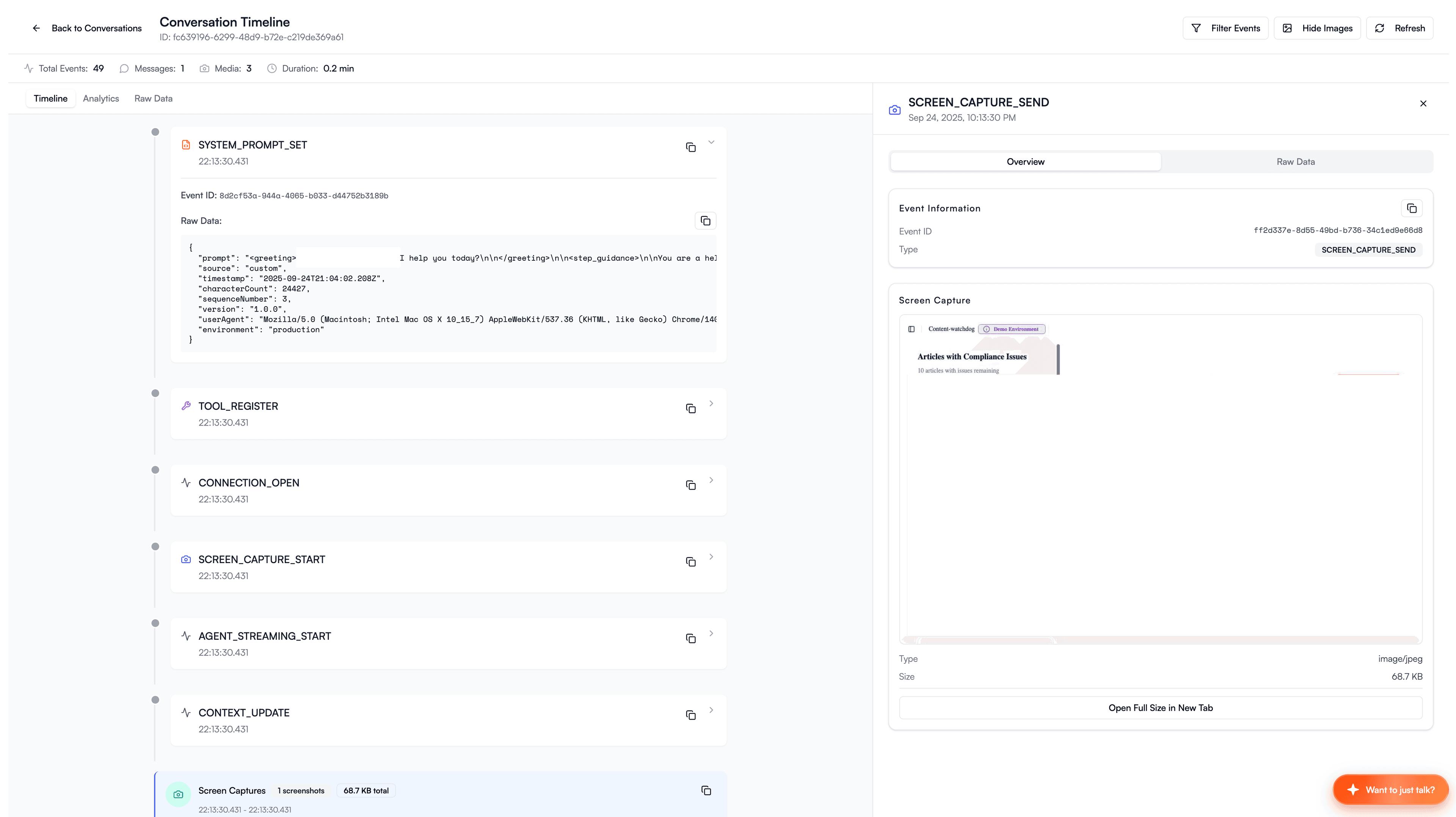
Event ordering turned out to be surprisingly hard because timestamps alone aren't enough - events can share the same millisecond, especially audio and capture events firing in tight loops. We combined performance.now() with a monotonic sequence counter, encoding the sequence as microsecond fractions: highResTime + sequenceNum / 1_000_000. It sounds over-engineered until you're trying to reconstruct why audio stuttered 45 minutes into a session and your events are out of order.
Recording Architecture
High-frequency logging on the main thread caused stalls, so we used worker-based batching where events queue on the main thread and ship to a worker that batches them (50 events or 5 seconds, whichever comes first) before sending to the API.
Audio accumulates faster than you'd think - user audio at 48kHz burns 96KB/s, agent audio at 24kHz burns 48KB/s. We flushed aggregated buffers every 10 seconds to keep memory bounded at roughly 1.4MB per conversation in flight at any time.
For debugging and training, you need to reconstruct full conversations from raw audio chunks. The trick is preserving natural timing - if the user speaks for 2 seconds, pauses for 1 second, and the agent responds, the reconstructed audio should have that 1-second gap. We sorted chunks by timestamp, padded silence for gaps, and generated stereo WAV files (user left channel, agent right channel) so you can isolate each side during analysis.
The stereo export resamples agent audio from 24kHz to 48kHz via linear interpolation to match the user channel - not audiophile quality, but good enough for debugging and eval playback.
Privacy controls were configurable per deployment:
const observabilityConfig = {
  enabled: true,
  includeSystemPrompt: false, // Don't log the prompt
  includeAudioData: false, // Don't log raw audio (size)
  includeImageData: true, // Screenshots useful for debugging
  disableEventTypes: ['audio.send'], // Skip high-frequency events
};
Observability tells you what broke. But some problems aren't bugs - they're browser constraints that no amount of logging will fix.
Browser Survival
Permission Flow
Permission prompts are disruptive, and most users don't understand them.
Browsers also suspend AudioContext until a user gesture - clicking, tapping, pressing a key. If you create your audio pipeline on page load, it silently does nothing. No error, no warning, just silence. We listened for pointerdown or keydown before resuming the context. This interacts with permission timing: you need the user gesture to unblock audio and to request microphone access. Get the sequence wrong and you burn the gesture on the wrong thing.
We used progressive flows: explain why the microphone is needed, request permission, show recovery instructions if denied, and provide a text fallback. The key is to never request on page load - wait for a user action that clearly implies voice interaction.
const { state, requestPermission } = useMicrophonePermission();

if (state === 'denied') {
  return <PermissionRecoveryInstructions />;
}

if (state === 'prompt') {
  return <PermissionExplanationModal onRequest={requestPermission} />;
}
SPA Navigation
SPAs don't emit native navigation events, which means agents lose page awareness entirely.
The naive fix is monkey-patching history.pushState. We ended up with a layered detection strategy because no single method works everywhere:
// Layer 1: Chrome Navigation API (modern browsers)
if ('navigation' in window) {
  navigation.addEventListener('navigate', handleNavigationChange);
}

// Layer 2: MutationObserver on <title> (catches client-side title updates)
const titleObserver = new MutationObserver(() => {
  debouncedNavigationCheck();
});
titleObserver.observe(document.querySelector('title'), { childList: true });

// Layer 3: Interval polling fallback (catches everything else)
setInterval(() => {
  if (currentUrl !== window.location.href) {
    currentUrl = window.location.href;
    handleNavigationChange();
  }
}, 500);
We also normalise URLs before comparing by stripping query params and hash. A user filtering a table (/people → /people?filter=active) shouldn't trigger a navigation event, but a route change (/people → /posts) should. Without this normalisation, the agent gets confused by every filter toggle and pagination click.
React Integration
React re-renders should not interfere with real-time audio, so we kept a provider for lifecycle and state while using a core class for imperative operations - stored in a useRef to avoid re-render cycles:
const agentCoreRef = useRef<AgentCore | null>(null);

const startAgent = useCallback(async (options) => {
  agentCoreRef.current = new AgentCore({...});
  await agentCoreRef.current.start(options);
}, []);
Stable callback references matter more than you'd think in this context. Recreated callbacks cause listener leaks and performance issues, so we used useCallback with empty dependency arrays for callbacks that should never change, or stored them in a useRef for truly stable references.
Dual Mode
Voice doesn't always work - loud offices, accessibility needs, spotty mobile microphones, or simply users who don't want to talk aloud. If your only interaction mode is voice, you lose all of these users.
We shipped both voice and text with runtime switching, and the lesson here is to build your context injection, memory system, and tool infrastructure as mode-agnostic from the start. Only the I/O layer should differ - if your memory search is coupled to audio events, you'll end up rebuilding it when you add text mode.
The critical pattern for mode switching: always destroy the previous agent before creating the new one. Enforce a strict stop → cleanup → create → start sequence. We shipped a version where switching from voice to text left orphaned audio workers consuming CPU in the background.
Error Recovery
Voice agents fail in many ways - network disconnects, token expiration, microphone permission loss, audio device changes, browser crashes - and every error needs a recovery path. Network issues get automatic retry with exponential backoff, expired tokens refresh via onTokenExpired callbacks, and lost microphone permissions trigger a re-request flow with clear instructions. When audio fails entirely, the agent degrades to text mode.
Gemini's Live API has built-in session resumption via sessionResumptionUpdate messages - the connection can drop and reconnect without losing conversation state. We leaned on this hard in production, especially on mobile where connections are flaky. Every error state gets its own UI component with a concrete recovery action - not a generic "something went wrong."
"WebSocket connection failed" means nothing to a user. "Connection lost. Reconnecting..." does.
Config and Routing
Precedence
We had no idea what NPM package version our users were on at any given time, and we couldn't force them to update. If we hardcoded the model or prompts into the package, improving anything meant shipping a new version and hoping people installed it. Server-side control let us update model selection, prompts, feature flags, cost routing, and even kill switches without touching the client at all.
We used explicit precedence ordering:
- Package defaults - sane starting point
- API configuration - server-side per-org overrides
- Session settings - per-conversation adjustments
- User overrides - client-side always wins
const effectiveModel =
  userOverride?.model ||
  apiConfig?.recommended_model ||
  'gemini-2.5-flash-preview-native-audio-dialog';
This allowed routing high-usage orgs to cheaper models, premium orgs to better models, experimental features behind flags, and geographic routing to region-specific endpoints - all without client deploys.
Prompt Layers
We hardcoded prompts in the first version. Every tweak required a package release, which meant waiting for users to update. Prompts are data, not code. We layered: base system prompt from API, context and navigation injections, memory and tool instructions, language instructions, training mode personas, runtime XML injections. Prompts lived server-side. We A/B tested them. We shipped updates without deploys.
Multi-Model Routing
No single model is best at everything, so we routed fast models to live conversational flow and stronger models to deep reasoning and tool chains. Specialised models handled domain tasks while cheaper ones ran background work like heavy reasoning, image generation, and safety review - anything not on the real-time path. A router model picked the right specialist per turn, and for duplex specifically, a small speech model handled overlap and affect while a larger text model powered tools and reasoning, with cached summaries between turns to keep hand-off cost low.
Our general mantra was make it work, make it fast, make it cheap - and don't fine-tune before you must.
Token Economics
Our first invoice from Google was 4x what we'd budgeted. Audio tokens far exceed text tokens. Images are ~250 tokens. Audio runs ~2,000 tokens per minute. Video is ~15,000 tokens per minute. A "what was that tweet an hour ago?" assistant implies ~1 million tokens of screen context. Both OpenAI Realtime and Gemini (v2.5+) offer implicit token caching that helps1415, but you still need to build your context management with these costs in mind.
Cost isn't the only risk. The failure modes are stranger than you'd expect.
Safety
Phantom Actions
The most interesting failure mode we observed was what we called "pretend tool calls" - the agent claims to execute tools it didn't actually run. "I've just sent that email for you" except it never called the send function. We also saw phantom web searches where the agent claims it searched when it didn't, and stale knowledge from training cutoffs showing up as confident answers.
We surfaced whether tools and searches actually executed because claiming action without taking it is far worse than admitting you can't do something. Our layers of defence included dedicated safety models where useful (Meta's Llama Guard, NVIDIA's NeMo Guardrails)16, pre-tool validation, and post-generation review.
Token Security
Anything shipped to the browser is public, and long-lived tokens in localStorage are a trap.
We used a tiered system: long-lived JWT in HTTP-only cookies (never accessible to JavaScript), short-lived session tokens (15-30 minutes) for API calls, and ephemeral tokens for AI service connections generated per session.
Voice sessions outlast token validity by a long way, so refresh needs to be completely seamless:
const config = {
  auth: {
    token: shortLivedToken,
    onTokenExpired: async () => {
      const newToken = await refreshFromSecureEndpoint();
      updateConfig({ auth: { token: newToken } });
    },
  },
};
We also moved WebSocket auth to the handshake rather than after connection - verify the JWT, close with code 4401 on failure, and never accept unauthenticated connections.
Voice sessions create persistent WebSocket connections to AI services. Generate ephemeral, session-scoped tokens server-side. The client never sees the actual API key. A leaked token with a 15-minute TTL scoped to a single session is vastly less dangerous than a leaked API key with indefinite access. In serverless environments (Vercel, Cloudflare Workers), use workload identity federation to avoid storing long-lived service account keys on the server itself.
Evals
Non-Deterministic Testing
Voice outputs are non-deterministic, which means traditional unit tests just don't work.
We measured probabilistic success instead: "it succeeds 98% of the time in this scenario," not "it passed once." We built datasets from production failures - real user questions, branching dialogues, tool-heavy interactions, and interrupt and timing edge cases.
The failure modes we tested for included P95 voice-to-voice latency above 0.9s, missing domain vocabulary, bad handling of names, false positive and negative interrupts, and tool precision dropping after 10+ turns. Every time something broke in production, we logged the failure mode and added it to our eval suite - that dataset of real failures became far more valuable than any generic benchmark. We'd recommend building your own evaluations for your specific tools since generic benchmarks don't capture specific multi-turn, tool-heavy patterns.
Traditional load testing doesn't work either - you need automated browser tests with real audio recordings, memory leak detection for long-running sessions (voice sessions last far longer than typical web sessions), and WebSocket stability testing under load. We caught a class of memory leaks that only surfaced after 30+ minutes of continuous conversation.
Package Design
Bundle Size
Bundle size is your users' problem, not yours - which means it's absolutely yours.
Our first published build was 1.6MB. Investigation revealed that 75% - 1.2MB - was source maps accidentally included. The fix was embarrassingly simple: configure the files field in package.json to exclude .map files.
After that, the real optimisation work started. We externalised large optional dependencies (Picovoice Koala and modern-screenshot moved to peerDependencies), added entry point splitting (/audio, /observability, /types) so bundlers can tree-shake unused subsystems, and used dynamic imports for optional features - Koala loads via import() at runtime, not at parse time.
The result: published package dropped from 1.6MB to ~200-250KB.
Optional Dependencies
Voice AI packages tend to pull in heavy dependencies. If you make all of them required, bundle size explodes and installs break when one optional library has a platform-specific build step.
The cleanest pattern for optional peer dependencies: import().catch(() => null). No build-time conditionals, no feature flags:
const [koala, voiceProcessor] = await Promise.all([
  import('@picovoice/koala-web').catch(() => null),
  import('@picovoice/web-voice-processor').catch(() => null),
]);

if (koala && voiceProcessor) {
  return createKoalaProcessor(koala, voiceProcessor, accessKey);
} else {
  return createWebAudioProcessor(audioContext);
}
Your package works out of the box with zero optional installs. Users who need better noise suppression add Koala. Everyone else gets a working baseline. Log a console message explaining what they're missing - don't fail silently, but don't fail loudly either.
Shipping
The gap between "it works in the monorepo" and "it works when someone installs it" is wider than you'd expect. Your package works locally because your monorepo's node_modules fills in undeclared dependencies, and it installs fine in CI because the workspace resolves everything. Then a user runs npm install in a clean project and it breaks.
The only reliable test is a clean install in a fresh project. Not your monorepo. Not your CI. A new directory with nothing in it. We automated publishing but kept this manual check because it caught issues automated linting missed - particularly around the exports map resolving differently in ESM vs. CommonJS contexts.
One last thing: iterate fast but version honestly. The temptation when shipping breaking config changes is to call it a patch, but every config shape change, every removed public method, every renamed prop - that's a major version bump. Beta versions (1.2.0-beta.1) let you iterate without breaking production users and to share amongst the team.
What I'd Do Differently
We bet on duplex early, and the bet paid off. The models are getting smarter, tool integration is getting more reliable, and the gap between duplex and pipeline is closing faster than I expected.
If I were starting over, I'd build the context system first - it's the intelligence layer that separates a dictation tool from an assistant. I'd instrument audio from day one instead of retrofitting observability after users complained. And I'd resist the urge to build pipeline systems "just to ship faster." We rebuilt ours pretty quick anyway.
The demo may work in your quiet office, but production will humble you.
Footnotes
-
AssemblyAI: "Low Latency Voice AI", 2024. Production voice AI delivers 1,400-1,700ms at median. Beyond 1 second, abandonment spikes 40%+. ↩ ↩2
-
Cartesia: "State of Voice AI 2024", 2024. Best-in-class pipeline at ~510ms (Deepgram STT: 100ms, GPT-4: 320ms, Cartesia TTS: 90ms). ↩
-
Stivers et al.: "Universals and cultural variations in turn-taking in conversation", PNAS 106(26):10587–10592, 2009. ↩ ↩2 ↩3
-
OpenAI: "Semantic VAD" - context-aware endpointing in the Realtime API. ↩
-
Pipecat: "Smart-Turn" - open-source native-audio turn detection model. ↩
-
Google: "Gemini Live API" - interruptions, affective dialogue, proactive non-response. ↩ ↩2 ↩3
-
Tom Kopec (LiveKit): "Voice AI's interruption problem" - Voice AI meetup talk on turn-taking and EOU demos. ↩ ↩2
-
AssemblyAI: "End-of-Utterance Detection" - streaming EOU with acoustic and semantic cues. ↩
-
OpenAI: "Introducing GPT-4o Realtime", 2024. Function calling improved from 49.7% to 66.5% on ComplexFuncBench. ↩
-
Li et al.: "Baichuan-Audio: A Unified Framework for End-to-End Speech Interaction", arXiv:2502.17239. ↩
-
Sesame: "Crossing the Uncanny Valley of Voice", 2025. ↩
-
SyncLLM: "Synchronous LLMs as Full-Duplex Dialogue Agents" - 212k hours of synthetic conversational data. ↩
-
Krisp: "Improving Turn-Taking of AI Voice Agents with Background Voice Cancellation", 2025. ↩
-
OpenAI: "Realtime API Caching" - automatic token caching with reduced pricing for cached audio tokens. ↩
-
Google: "Gemini Context Caching" - implicit caching in Gemini 2.5+ reduces cost on repeated context. ↩
-
Guardrails frameworks: Meta Llama Guard, NVIDIA NeMo Guardrails. ↩