Email spoofing is ridiculously easy. Anyone can connect to a mail server and pretend to send from your domain. No authentication needed. This design flaw has led to decades of phishing and business email attacks.
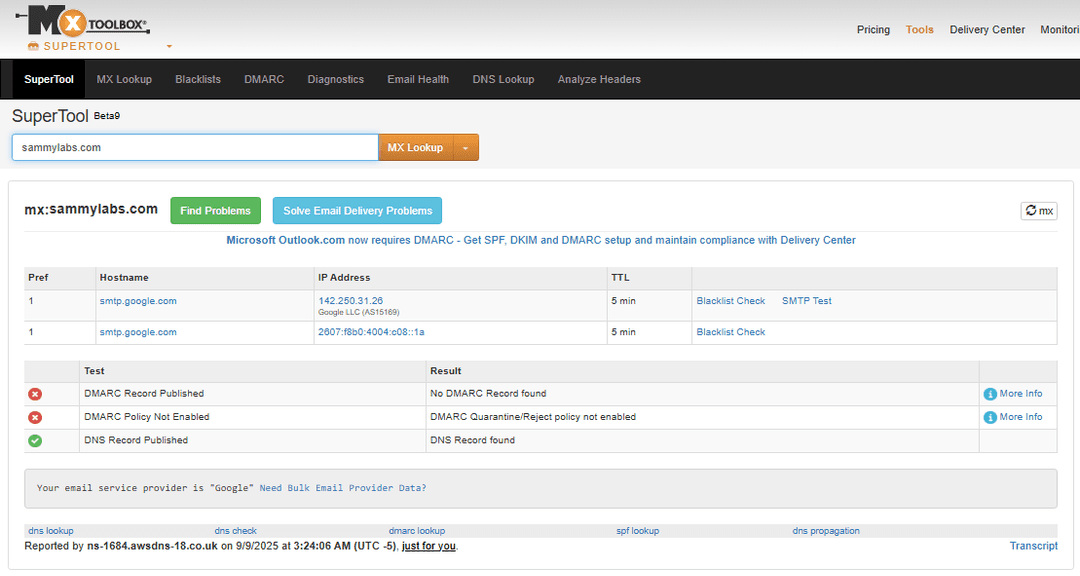
DMARC stops people from forging emails that look like they came from you.
A security researcher recently showed me how broken this was by sending me a forged email that looked like it came from my own contact address.
Why Email Is Broken
Email was built in the 1980s, before anyone thought about spam or phishing. SMTP has no way to check if someone is actually allowed to send from your domain.
So anyone can:
- Forge the "From" field in any email
- Impersonate your business to fool customers or employees
- Damage your reputation with spoofed messages
The fix needs three pieces: SPF, DKIM, and DMARC.
The Three-Part Fix
SPF (Sender Policy Framework)
SPF is a DNS record that says which servers can send email for your domain. When someone gets an email from you, their server checks this list.
v=spf1 include:_spf.google.com -allTranslation: Only Google can send email for my domain. Block everything else.
DKIM (DomainKeys Identified Mail)
DKIM works like a wax seal on old letters:
- Gmail signs your emails with a private key
- You put the public key in DNS
- Recipients check the signature to make sure nobody messed with the message
The DNS record looks like:
google._domainkey.yourdomain.com TXT "v=DKIM1; k=rsa; p=MIIBIjANBg..."DMARC (Domain-based Message Authentication, Reporting, and Conformance)
DMARC combines SPF and DKIM with a policy that says what to do when emails fail the checks:
- p=none - Monitor only, don't block anything
- p=quarantine - Send failing messages to spam
- p=reject - Block failing messages entirely
Plus DMARC sends you reports showing who's trying to fake your domain.
Setting This Up with Gmail
If you use Google Workspace, here's how to lock down your domain:
Step 1: Add SPF Record
- Go to AWS Console → Route 53 → Hosted zones → your-domain.com
- Create a TXT record:
- Name: Leave blank (root domain)
- Type: TXT
- Value:
"v=spf1 include:_spf.google.com -all" - TTL: 300
Step 2: Set Up DKIM
- Go to Google Admin Console at
admin.google.com - Navigate to Apps → Google Workspace → Gmail → Authenticate Email
- Select your domain and click Generate New Record (use 2048-bit)
- Google gives you a TXT record like:
google._domainkey.yourdomain.com TXT "v=DKIM1; k=rsa; p=MIIBIjAN..." - Add this to Route 53 with TTL 300
- Back in Admin Console, click Start Authentication
If Route 53 says CharacterStringTooLong, split the DKIM key into chunks under 255 characters
Step 3: Add DMARC Policy
Create one more TXT record:
- Name:
_dmarc - Type: TXT
- Value:
"v=DMARC1; p=none; rua=mailto:dmarc-reports@yourdomain.com; ruf=mailto:dmarc-fail@yourdomain.com; fo=1; pct=100; aspf=r; adkim=r; sp=none" - TTL: 300
This starts in monitor mode (p=none) so you can check reports before blocking anything.
What That DMARC Record Means
Here's what each part does:
- v=DMARC1 - Protocol version
- p=none - Policy for main domain (none/quarantine/reject)
- rua=mailto:... - Where to send daily aggregate reports
- ruf=mailto:... - Where to send individual failure reports
- fo=1 - Send forensic reports for any authentication failure
- pct=100 - Apply policy to 100% of mail
- aspf=r - SPF alignment mode (relaxed)
- adkim=r - DKIM alignment mode (relaxed)
- sp=none - Subdomain policy
Don't Go Straight to Reject
Roll this out slowly:
- Week 1-2: Monitor with
p=noneand review aggregate reports - Week 3-4: Move to
p=quarantinewithpct=25(25% of failing mail) - Week 5-6: Increase to
pct=100quarantine - Final: Enforce with
p=rejectonce confident all legitimate mail passes
Your final "block everything" record:
v=DMARC1; p=reject; rua=mailto:dmarc-reports@yourdomain.com; fo=1; aspf=s; adkim=s; sp=rejectCheck Your Work
Make sure everything's set up right:
dig +short TXT yourdomain.com                    # SPF
dig +short TXT google._domainkey.yourdomain.com  # DKIM
dig +short TXT _dmarc.yourdomain.com             # DMARC
Or use Google's Check MX tool if you prefer clicking buttons.
Reading DMARC Reports
Reports come as zipped XML files with:
- Who's trying to send as your domain
- Whether they passed SPF/DKIM checks
- How much mail each sender attempted
- What happened to failed messages
These show you:
- Legit senders you forgot about
- Bad actors trying to spoof you
- Stuff you misconfigured
Mistakes you can make here
- Incomplete SPF: Forget to include your marketing platform or CRM? Your emails won't deliver.
- Going Too Fast: Jump straight to
p=rejectand you'll block legit mail you didn't know about. - Ignoring Reports: Those XML files aren't just noise - they show real attacks and config problems.
- Forgetting Subdomains: Skip
sp=rejectand attackers can spoof mail.yourdomain.com all day.
Wrap Up
Email authentication isn't optional anymore. SPF, DKIM, and DMARC together stop domain spoofing and show you who's trying to fake your emails.
Start slow with monitoring, read those reports, then gradually get stricter. Your customers and brand will thank you.
That researcher who showed me the vulnerability was right - no DMARC means anyone can spoof you. But set this up properly and you'll close that hole while getting useful intel on your email traffic.